> ## Documentation Index
> Fetch the complete documentation index at: https://docs-dev-react-sdk-reference.mintlify.site/llms.txt
> Use this file to discover all available pages before exploring further.

> Learn how to configure an update policy form using Forms for Actions for users to review and accept new terms of service or consent updates.

# Use Cases: Configure an update policy form using Forms

<Card title="Before you start">
  1. Create a [Machine-to-Machine Application](/docs/get-started/auth0-overview/create-applications/machine-to-machine-apps) with the following scopes enabled:

  * `read:users`
  * `update:users`
  * `create:users`
  * `read:users_app_metadata`
  * `update:users_app_metadata`
  * `create:users_app_metadata`

  2. Add a [Vault connection](/docs/customize/forms/vault) using the M2M application credentials.
</Card>

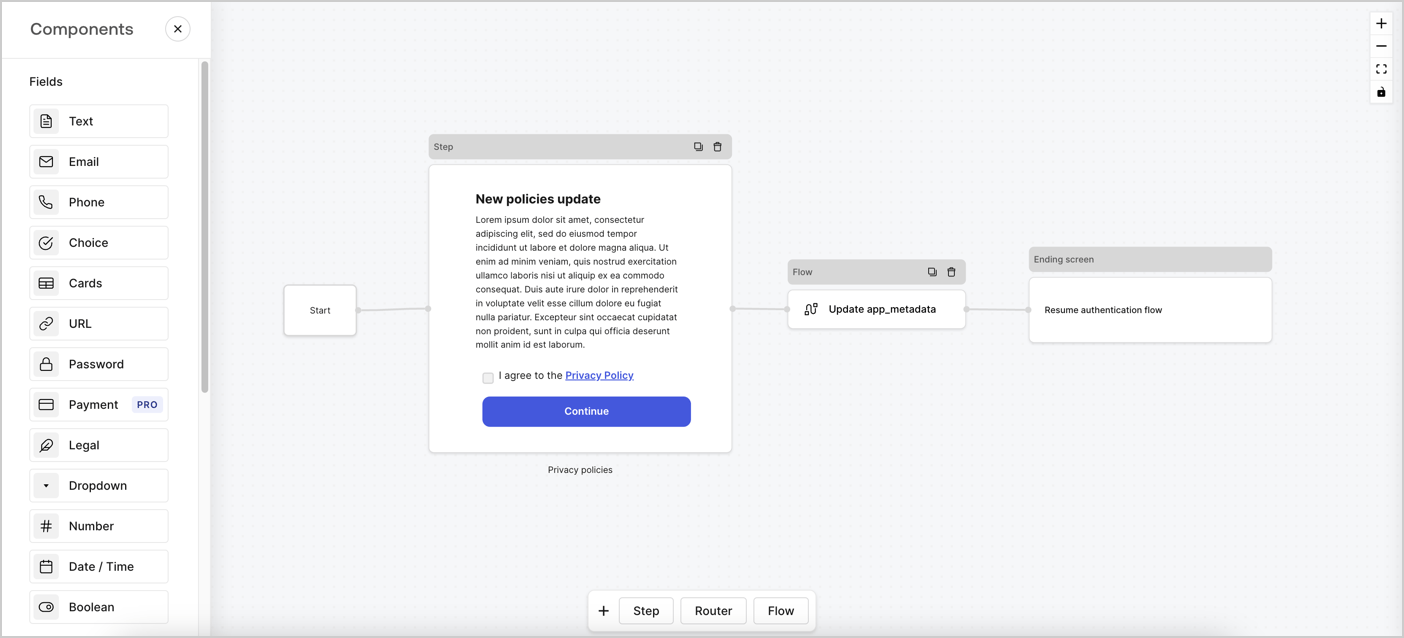
Forms for Actions allows you to create custom privacy policies flows and store the consent under the `app_metadata` object.
<Frame>
  <img src="https://mintcdn.com/docs-dev-react-sdk-reference/x0bGg8uI-XBB-Z8H/docs/images/cdy7uua7fh8z/6i68dMvHDTijfRmSgN1x8Q/ad900e7d4c0fb34645921435472b8684/privavy-policy-form.png?fit=max&auto=format&n=x0bGg8uI-XBB-Z8H&q=85&s=0a17f73cb9064fe6d4e145f6920dd990" alt="Dashboard > Actions > Forms > Privacy policy use case" data-og-width="1404" width="1404" data-og-height="638" height="638" data-path="docs/images/cdy7uua7fh8z/6i68dMvHDTijfRmSgN1x8Q/ad900e7d4c0fb34645921435472b8684/privavy-policy-form.png" data-optimize="true" data-opv="3" srcset="https://mintcdn.com/docs-dev-react-sdk-reference/x0bGg8uI-XBB-Z8H/docs/images/cdy7uua7fh8z/6i68dMvHDTijfRmSgN1x8Q/ad900e7d4c0fb34645921435472b8684/privavy-policy-form.png?w=280&fit=max&auto=format&n=x0bGg8uI-XBB-Z8H&q=85&s=182236fc49bf9f58deabd9d5f19c2e7d 280w, https://mintcdn.com/docs-dev-react-sdk-reference/x0bGg8uI-XBB-Z8H/docs/images/cdy7uua7fh8z/6i68dMvHDTijfRmSgN1x8Q/ad900e7d4c0fb34645921435472b8684/privavy-policy-form.png?w=560&fit=max&auto=format&n=x0bGg8uI-XBB-Z8H&q=85&s=380f02fa1e0f1e08b4a33ee1350a8f7f 560w, https://mintcdn.com/docs-dev-react-sdk-reference/x0bGg8uI-XBB-Z8H/docs/images/cdy7uua7fh8z/6i68dMvHDTijfRmSgN1x8Q/ad900e7d4c0fb34645921435472b8684/privavy-policy-form.png?w=840&fit=max&auto=format&n=x0bGg8uI-XBB-Z8H&q=85&s=27cebae8427c31e28a373b97760c6bb6 840w, https://mintcdn.com/docs-dev-react-sdk-reference/x0bGg8uI-XBB-Z8H/docs/images/cdy7uua7fh8z/6i68dMvHDTijfRmSgN1x8Q/ad900e7d4c0fb34645921435472b8684/privavy-policy-form.png?w=1100&fit=max&auto=format&n=x0bGg8uI-XBB-Z8H&q=85&s=97fa9a1494361708f15568dab4be417b 1100w, https://mintcdn.com/docs-dev-react-sdk-reference/x0bGg8uI-XBB-Z8H/docs/images/cdy7uua7fh8z/6i68dMvHDTijfRmSgN1x8Q/ad900e7d4c0fb34645921435472b8684/privavy-policy-form.png?w=1650&fit=max&auto=format&n=x0bGg8uI-XBB-Z8H&q=85&s=6b0605da16ff55904c1b53b7bcb234cb 1650w, https://mintcdn.com/docs-dev-react-sdk-reference/x0bGg8uI-XBB-Z8H/docs/images/cdy7uua7fh8z/6i68dMvHDTijfRmSgN1x8Q/ad900e7d4c0fb34645921435472b8684/privavy-policy-form.png?w=2500&fit=max&auto=format&n=x0bGg8uI-XBB-Z8H&q=85&s=ba82c9950c505763f352c370ac6f9d3d 2500w" />
</Frame>

The sections below outline how you can create an Update Policy form using nodes and flows, along with steps for adding your form to a [Post Login](/docs/customize/actions/explore-triggers/signup-and-login-triggers/login-trigger) Action.

## Create a form from scratch

Follow these steps to create a form to gather information:

1. Open the Form editor by selecting **Auth0 Dashboard > Actions > Forms.**
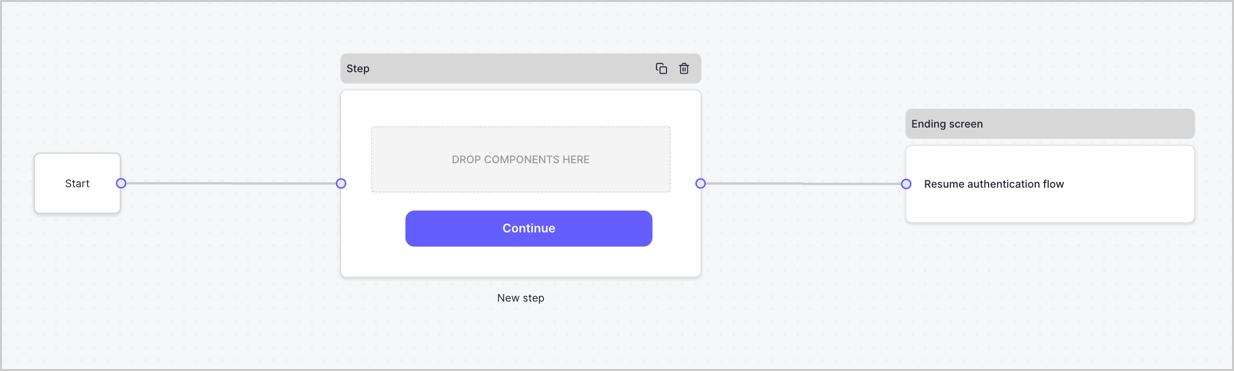
2. Select **Create Form** > **Start from scratch**.

By default, a new form contains a Start node, a Step node, and an Ending screen node.
<Frame>
  <img src="https://mintcdn.com/docs-dev-react-sdk-reference/_ZKpDxqXoTpYbpVt/docs/images/cdy7uua7fh8z/2TZ9jSjgEcARFpULI6hz4R/a4319a1bd482f2ee5cc23100fdb2f42c/New-form-Forms-for-action-use-case.png?fit=max&auto=format&n=_ZKpDxqXoTpYbpVt&q=85&s=c7779de63b277425944f0941064e89a0" alt="Dashboard > Forms > Use Cases > Form" data-og-width="1234" width="1234" data-og-height="371" height="371" data-path="docs/images/cdy7uua7fh8z/2TZ9jSjgEcARFpULI6hz4R/a4319a1bd482f2ee5cc23100fdb2f42c/New-form-Forms-for-action-use-case.png" data-optimize="true" data-opv="3" srcset="https://mintcdn.com/docs-dev-react-sdk-reference/_ZKpDxqXoTpYbpVt/docs/images/cdy7uua7fh8z/2TZ9jSjgEcARFpULI6hz4R/a4319a1bd482f2ee5cc23100fdb2f42c/New-form-Forms-for-action-use-case.png?w=280&fit=max&auto=format&n=_ZKpDxqXoTpYbpVt&q=85&s=000cab8663d01738443b1d75d0127c10 280w, https://mintcdn.com/docs-dev-react-sdk-reference/_ZKpDxqXoTpYbpVt/docs/images/cdy7uua7fh8z/2TZ9jSjgEcARFpULI6hz4R/a4319a1bd482f2ee5cc23100fdb2f42c/New-form-Forms-for-action-use-case.png?w=560&fit=max&auto=format&n=_ZKpDxqXoTpYbpVt&q=85&s=9fd53a5bf252f0b77ba62ea88ac49e2f 560w, https://mintcdn.com/docs-dev-react-sdk-reference/_ZKpDxqXoTpYbpVt/docs/images/cdy7uua7fh8z/2TZ9jSjgEcARFpULI6hz4R/a4319a1bd482f2ee5cc23100fdb2f42c/New-form-Forms-for-action-use-case.png?w=840&fit=max&auto=format&n=_ZKpDxqXoTpYbpVt&q=85&s=4662a2aa51824b1fac4ccd417812ad49 840w, https://mintcdn.com/docs-dev-react-sdk-reference/_ZKpDxqXoTpYbpVt/docs/images/cdy7uua7fh8z/2TZ9jSjgEcARFpULI6hz4R/a4319a1bd482f2ee5cc23100fdb2f42c/New-form-Forms-for-action-use-case.png?w=1100&fit=max&auto=format&n=_ZKpDxqXoTpYbpVt&q=85&s=255ee69bbafd068783fffb677b509988 1100w, https://mintcdn.com/docs-dev-react-sdk-reference/_ZKpDxqXoTpYbpVt/docs/images/cdy7uua7fh8z/2TZ9jSjgEcARFpULI6hz4R/a4319a1bd482f2ee5cc23100fdb2f42c/New-form-Forms-for-action-use-case.png?w=1650&fit=max&auto=format&n=_ZKpDxqXoTpYbpVt&q=85&s=5bf1d75b4602bceb2045241eb59f5900 1650w, https://mintcdn.com/docs-dev-react-sdk-reference/_ZKpDxqXoTpYbpVt/docs/images/cdy7uua7fh8z/2TZ9jSjgEcARFpULI6hz4R/a4319a1bd482f2ee5cc23100fdb2f42c/New-form-Forms-for-action-use-case.png?w=2500&fit=max&auto=format&n=_ZKpDxqXoTpYbpVt&q=85&s=6ac29b977bce8e28795b3b4bfc69d4b2 2500w" />
</Frame>

### Configure the Step node

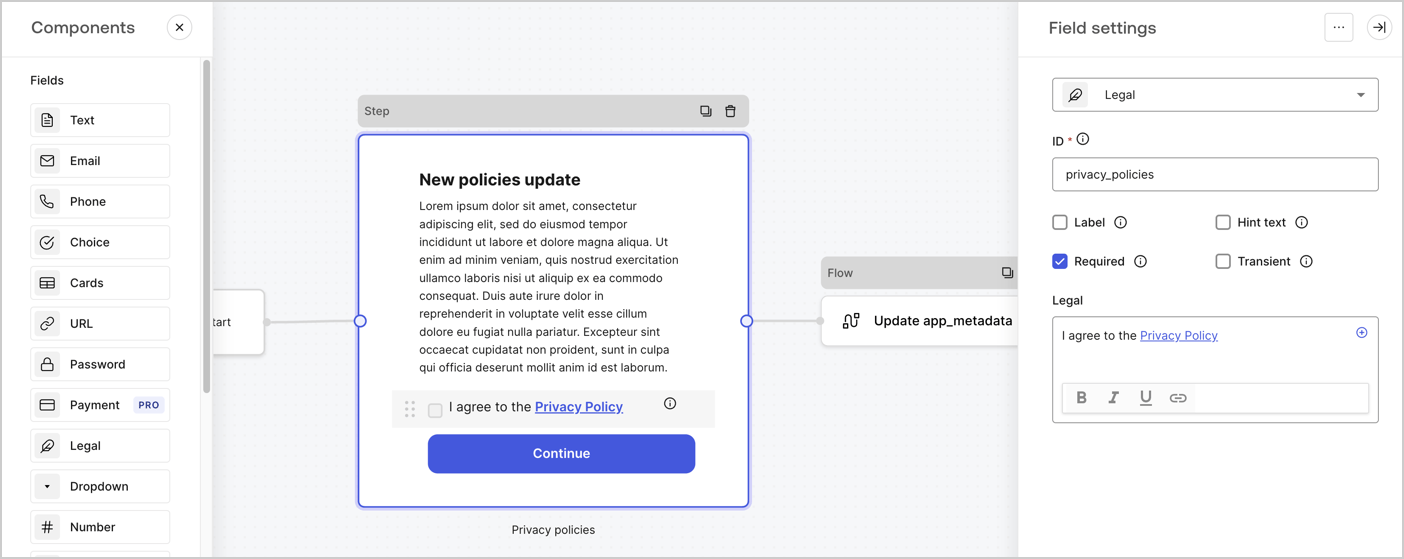
The Step node is the graphical interface visible to users. Add [Fields](/docs/customize/forms/nodes-and-components) to the Step node to collect the new agreement acceptance value by following these steps:

1. Drag a **Rich text** field from the **Components menu** into the **Step** node.

   * **Rich text**: Enter a description of your privacy policies updates.
   * Select **Save**.
2. Drag a **Legal** field into the **Step** node.

   * **ID**: Enter `privacy_policies`.
   * **Required**: Enable the checkbox.
   * **Legal**: Enter `I agree to the Privacy Policy`.
   * Select **Save**.
3. Select **Publish** to save.
<Frame>
  <img src="https://mintcdn.com/docs-dev-react-sdk-reference/iFkiR19PIKQedekc/docs/images/cdy7uua7fh8z/59zFFjQjAnjogkc2QGIqqJ/0ad66b1b636544122aa4e65968b76c2c/privacy-policy-step-node.png?fit=max&auto=format&n=iFkiR19PIKQedekc&q=85&s=a0cebf160d6903e48aa05834171d3402" alt="Dashboard > Actions > Forms > Use case privacy policy step node" data-og-width="1404" width="1404" data-og-height="559" height="559" data-path="docs/images/cdy7uua7fh8z/59zFFjQjAnjogkc2QGIqqJ/0ad66b1b636544122aa4e65968b76c2c/privacy-policy-step-node.png" data-optimize="true" data-opv="3" srcset="https://mintcdn.com/docs-dev-react-sdk-reference/iFkiR19PIKQedekc/docs/images/cdy7uua7fh8z/59zFFjQjAnjogkc2QGIqqJ/0ad66b1b636544122aa4e65968b76c2c/privacy-policy-step-node.png?w=280&fit=max&auto=format&n=iFkiR19PIKQedekc&q=85&s=db3e57994df86c71e0c8498aeedaf491 280w, https://mintcdn.com/docs-dev-react-sdk-reference/iFkiR19PIKQedekc/docs/images/cdy7uua7fh8z/59zFFjQjAnjogkc2QGIqqJ/0ad66b1b636544122aa4e65968b76c2c/privacy-policy-step-node.png?w=560&fit=max&auto=format&n=iFkiR19PIKQedekc&q=85&s=51e778bf45df6c1fed921d2b63bdc42d 560w, https://mintcdn.com/docs-dev-react-sdk-reference/iFkiR19PIKQedekc/docs/images/cdy7uua7fh8z/59zFFjQjAnjogkc2QGIqqJ/0ad66b1b636544122aa4e65968b76c2c/privacy-policy-step-node.png?w=840&fit=max&auto=format&n=iFkiR19PIKQedekc&q=85&s=6d91878ed5c38175fec5f48d074260fa 840w, https://mintcdn.com/docs-dev-react-sdk-reference/iFkiR19PIKQedekc/docs/images/cdy7uua7fh8z/59zFFjQjAnjogkc2QGIqqJ/0ad66b1b636544122aa4e65968b76c2c/privacy-policy-step-node.png?w=1100&fit=max&auto=format&n=iFkiR19PIKQedekc&q=85&s=115805a447adc11f50c516c8440e1530 1100w, https://mintcdn.com/docs-dev-react-sdk-reference/iFkiR19PIKQedekc/docs/images/cdy7uua7fh8z/59zFFjQjAnjogkc2QGIqqJ/0ad66b1b636544122aa4e65968b76c2c/privacy-policy-step-node.png?w=1650&fit=max&auto=format&n=iFkiR19PIKQedekc&q=85&s=76ec3f9472dfeca14f6e469ca0a943fc 1650w, https://mintcdn.com/docs-dev-react-sdk-reference/iFkiR19PIKQedekc/docs/images/cdy7uua7fh8z/59zFFjQjAnjogkc2QGIqqJ/0ad66b1b636544122aa4e65968b76c2c/privacy-policy-step-node.png?w=2500&fit=max&auto=format&n=iFkiR19PIKQedekc&q=85&s=9e496ef8de5537c11d5cd217ce4a2fc4 2500w" />
</Frame>

### Configure the Flow node

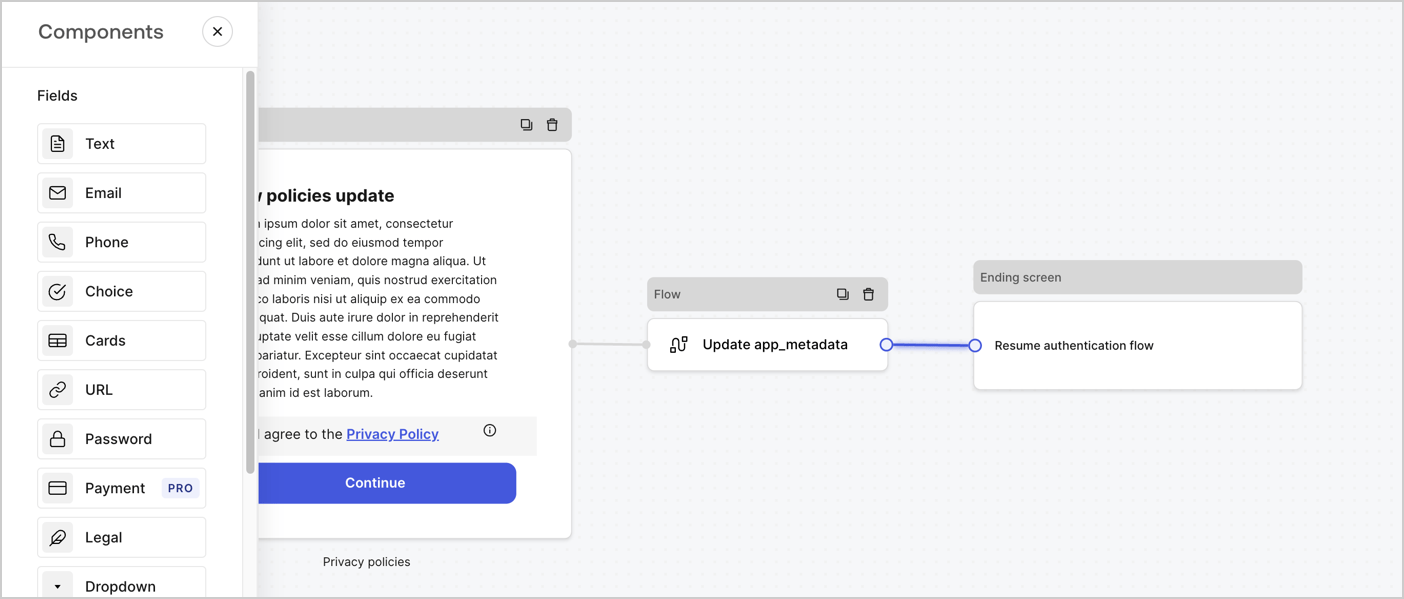
Add a **Flow** node after the **Step** node to update the `app_metadata` and resume the authentication flow by following these steps:

1. Select **Flow** from the bottom of the Form editor.
2. Remove the existing link between the **Step** and **Ending Screen** nodes.
3. Select the new **Flow** > **Click to add a flow** > **Create a new flow.**

   * Enter `Update app_metadata` in the **Name** field.
   * Select **Create**.
   * Select **Save**.
4. Link the **Flow** node to the **Step** and **Ending Screen** nodes as pictured below.
5. Select **Publish** to save.
<Frame>
  <img src="https://mintcdn.com/docs-dev-react-sdk-reference/x0bGg8uI-XBB-Z8H/docs/images/cdy7uua7fh8z/6YIkzm7SrpM9LW76AXuRzh/353c518fe82bbaa440836da1d83596d6/link-policies.png?fit=max&auto=format&n=x0bGg8uI-XBB-Z8H&q=85&s=2ec35cbdacaddf509525f8d35a62a75a" alt="Dashboard > Actions > Forms > Form" data-og-width="1404" width="1404" data-og-height="599" height="599" data-path="docs/images/cdy7uua7fh8z/6YIkzm7SrpM9LW76AXuRzh/353c518fe82bbaa440836da1d83596d6/link-policies.png" data-optimize="true" data-opv="3" srcset="https://mintcdn.com/docs-dev-react-sdk-reference/x0bGg8uI-XBB-Z8H/docs/images/cdy7uua7fh8z/6YIkzm7SrpM9LW76AXuRzh/353c518fe82bbaa440836da1d83596d6/link-policies.png?w=280&fit=max&auto=format&n=x0bGg8uI-XBB-Z8H&q=85&s=377e876c0885675d49fd3c05fdd766de 280w, https://mintcdn.com/docs-dev-react-sdk-reference/x0bGg8uI-XBB-Z8H/docs/images/cdy7uua7fh8z/6YIkzm7SrpM9LW76AXuRzh/353c518fe82bbaa440836da1d83596d6/link-policies.png?w=560&fit=max&auto=format&n=x0bGg8uI-XBB-Z8H&q=85&s=b9bc2766427be5e2c50df2b2dea9ded3 560w, https://mintcdn.com/docs-dev-react-sdk-reference/x0bGg8uI-XBB-Z8H/docs/images/cdy7uua7fh8z/6YIkzm7SrpM9LW76AXuRzh/353c518fe82bbaa440836da1d83596d6/link-policies.png?w=840&fit=max&auto=format&n=x0bGg8uI-XBB-Z8H&q=85&s=852d5193500c884be9214d5f025aeb84 840w, https://mintcdn.com/docs-dev-react-sdk-reference/x0bGg8uI-XBB-Z8H/docs/images/cdy7uua7fh8z/6YIkzm7SrpM9LW76AXuRzh/353c518fe82bbaa440836da1d83596d6/link-policies.png?w=1100&fit=max&auto=format&n=x0bGg8uI-XBB-Z8H&q=85&s=a6b175f9615304f6cdf0a09647ca85fc 1100w, https://mintcdn.com/docs-dev-react-sdk-reference/x0bGg8uI-XBB-Z8H/docs/images/cdy7uua7fh8z/6YIkzm7SrpM9LW76AXuRzh/353c518fe82bbaa440836da1d83596d6/link-policies.png?w=1650&fit=max&auto=format&n=x0bGg8uI-XBB-Z8H&q=85&s=ddb1df938e37219c01174195cf115836 1650w, https://mintcdn.com/docs-dev-react-sdk-reference/x0bGg8uI-XBB-Z8H/docs/images/cdy7uua7fh8z/6YIkzm7SrpM9LW76AXuRzh/353c518fe82bbaa440836da1d83596d6/link-policies.png?w=2500&fit=max&auto=format&n=x0bGg8uI-XBB-Z8H&q=85&s=7e7c0d17dae05ac9342453489580be96 2500w" />
</Frame>

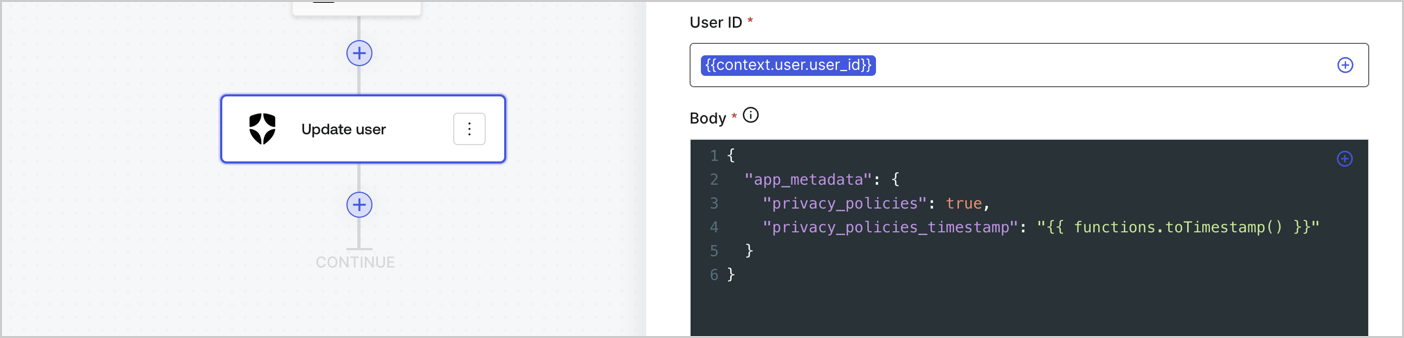
Add an Auth0 Update user action to the flow by following these steps:

1. Select the **Flow** **Update app\_metadata** > **Edit flow** to open the Flow editor in a new tab.
2. Below the StartAction, select the **+** icon to add an **Update user** action. Complete the fields below, then select **Save** to continue.

   * **Connection**: Select from the dropdown the Vault connection to your M2M application.

   * **User ID**: Enter `{{context.user.user_id}}`.

   * **Body**: Copy and paste the following code to update the app\_metadata with the privacy\_policies and privacy\_policies\_timestamp properties.

     ```text lines theme={null}
     {
       "app_metadata": {
         "privacy_policies": true,
         "privacy_policies_timestamp": "{{ functions.toTimestamp() }}"
       }
     }
     ```

   * Select **Save**.
3. Select **Publish** to save.
<Frame>
  <img src="https://mintcdn.com/docs-dev-react-sdk-reference/A438GjURcgVmJD4-/docs/images/cdy7uua7fh8z/CvMNIwWrOUwaFW4X3G28p/1fb70ae57a20749d9ffaaba8dc0b7e26/update-user-privacy.png?fit=max&auto=format&n=A438GjURcgVmJD4-&q=85&s=63323ae5de535cedc82edc576e4aeb4d" alt="Dashboard > Actions > Forms > User case privacy policy code" data-og-width="1404" width="1404" data-og-height="338" height="338" data-path="docs/images/cdy7uua7fh8z/CvMNIwWrOUwaFW4X3G28p/1fb70ae57a20749d9ffaaba8dc0b7e26/update-user-privacy.png" data-optimize="true" data-opv="3" srcset="https://mintcdn.com/docs-dev-react-sdk-reference/A438GjURcgVmJD4-/docs/images/cdy7uua7fh8z/CvMNIwWrOUwaFW4X3G28p/1fb70ae57a20749d9ffaaba8dc0b7e26/update-user-privacy.png?w=280&fit=max&auto=format&n=A438GjURcgVmJD4-&q=85&s=195864ca47a26c7031851ed7f13a24eb 280w, https://mintcdn.com/docs-dev-react-sdk-reference/A438GjURcgVmJD4-/docs/images/cdy7uua7fh8z/CvMNIwWrOUwaFW4X3G28p/1fb70ae57a20749d9ffaaba8dc0b7e26/update-user-privacy.png?w=560&fit=max&auto=format&n=A438GjURcgVmJD4-&q=85&s=8ccea2b0b35cc9c87c24e75fae8b82ba 560w, https://mintcdn.com/docs-dev-react-sdk-reference/A438GjURcgVmJD4-/docs/images/cdy7uua7fh8z/CvMNIwWrOUwaFW4X3G28p/1fb70ae57a20749d9ffaaba8dc0b7e26/update-user-privacy.png?w=840&fit=max&auto=format&n=A438GjURcgVmJD4-&q=85&s=9e93f1e67829072200f5d06d000d8b6e 840w, https://mintcdn.com/docs-dev-react-sdk-reference/A438GjURcgVmJD4-/docs/images/cdy7uua7fh8z/CvMNIwWrOUwaFW4X3G28p/1fb70ae57a20749d9ffaaba8dc0b7e26/update-user-privacy.png?w=1100&fit=max&auto=format&n=A438GjURcgVmJD4-&q=85&s=74186ce54dab4cd268cbcc7bafd36870 1100w, https://mintcdn.com/docs-dev-react-sdk-reference/A438GjURcgVmJD4-/docs/images/cdy7uua7fh8z/CvMNIwWrOUwaFW4X3G28p/1fb70ae57a20749d9ffaaba8dc0b7e26/update-user-privacy.png?w=1650&fit=max&auto=format&n=A438GjURcgVmJD4-&q=85&s=344d9a9fdbf0b4f775a80df82a5a668a 1650w, https://mintcdn.com/docs-dev-react-sdk-reference/A438GjURcgVmJD4-/docs/images/cdy7uua7fh8z/CvMNIwWrOUwaFW4X3G28p/1fb70ae57a20749d9ffaaba8dc0b7e26/update-user-privacy.png?w=2500&fit=max&auto=format&n=A438GjURcgVmJD4-&q=85&s=6fb1dcb58fee9e64046f66fe02e106b4 2500w" />
</Frame>

<Callout icon="file-lines" color="#0EA5E9" iconType="regular">
  The flow **Update app\_metadata** adds a `privacy_policies true` value to the app`_metadata` object and also generates a timestamp with a [helper function.](/docs/customize/forms/variables)
</Callout>

## Retrieve the form render code

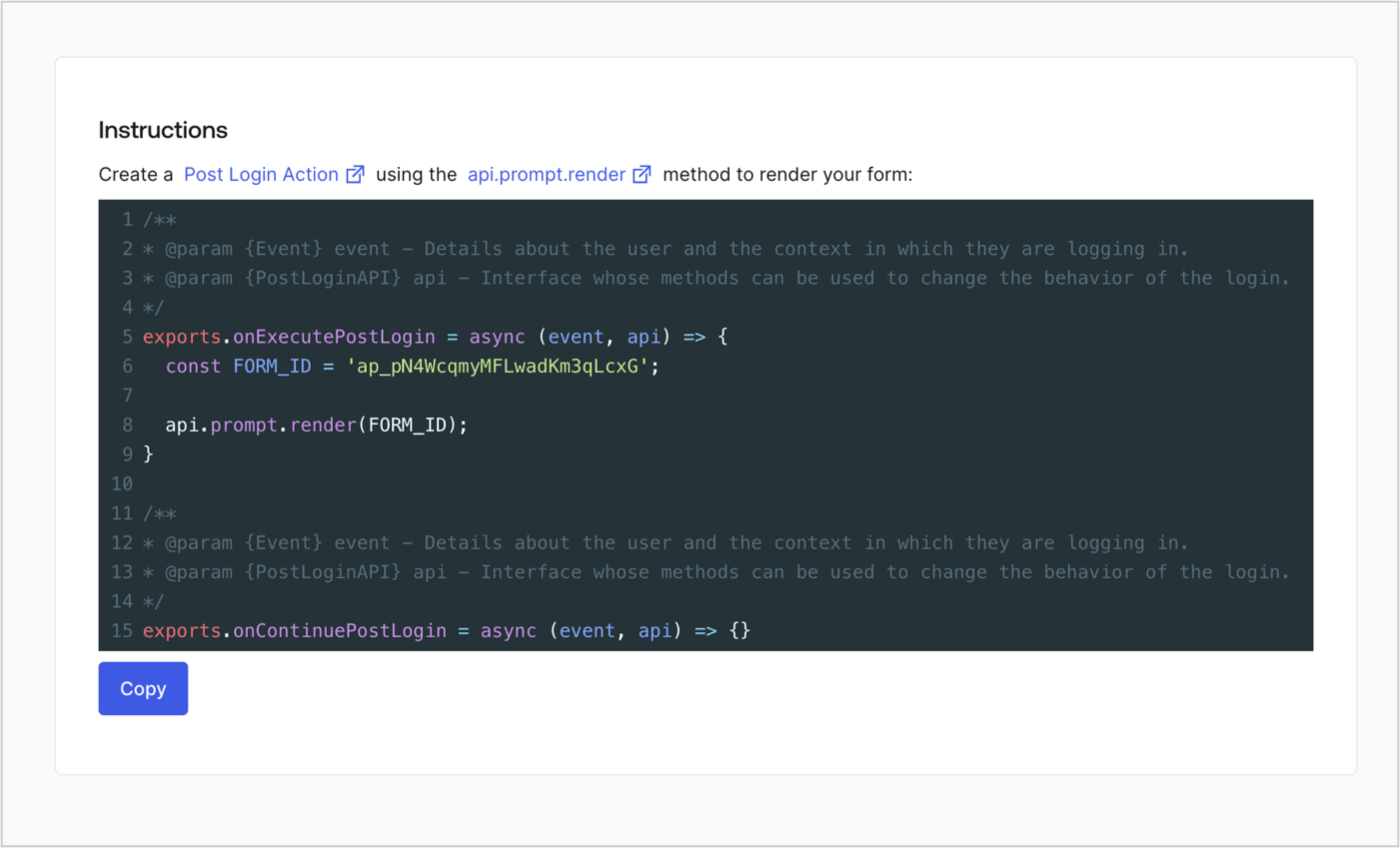
Retrieve your form render code to visually render the form with a custom Post Login Action by following these steps:

* From the Form editor, select **`<> Render`**.
* Select **Copy**.
<Frame>
  <img src="https://mintcdn.com/docs-dev-react-sdk-reference/oy6IBZBKl4tzK2RW/docs/images/cdy7uua7fh8z/2EIUzc539sq9lwoTKbjoJv/496a864c0fc44a782c9cadca119dbfb0/embed.png?fit=max&auto=format&n=oy6IBZBKl4tzK2RW&q=85&s=026e5f1bb3ba9069184436db1718b41b" alt="Dashboard > Actions > Forms > Form > Embed" data-og-width="1400" width="1400" data-og-height="848" height="848" data-path="docs/images/cdy7uua7fh8z/2EIUzc539sq9lwoTKbjoJv/496a864c0fc44a782c9cadca119dbfb0/embed.png" data-optimize="true" data-opv="3" srcset="https://mintcdn.com/docs-dev-react-sdk-reference/oy6IBZBKl4tzK2RW/docs/images/cdy7uua7fh8z/2EIUzc539sq9lwoTKbjoJv/496a864c0fc44a782c9cadca119dbfb0/embed.png?w=280&fit=max&auto=format&n=oy6IBZBKl4tzK2RW&q=85&s=eeb3e0c195aaf0892873fdb26c2b2606 280w, https://mintcdn.com/docs-dev-react-sdk-reference/oy6IBZBKl4tzK2RW/docs/images/cdy7uua7fh8z/2EIUzc539sq9lwoTKbjoJv/496a864c0fc44a782c9cadca119dbfb0/embed.png?w=560&fit=max&auto=format&n=oy6IBZBKl4tzK2RW&q=85&s=1f7969adee807fc99fc2df3cdf8d0996 560w, https://mintcdn.com/docs-dev-react-sdk-reference/oy6IBZBKl4tzK2RW/docs/images/cdy7uua7fh8z/2EIUzc539sq9lwoTKbjoJv/496a864c0fc44a782c9cadca119dbfb0/embed.png?w=840&fit=max&auto=format&n=oy6IBZBKl4tzK2RW&q=85&s=2725372fb766b326f3c0cd5e14a11849 840w, https://mintcdn.com/docs-dev-react-sdk-reference/oy6IBZBKl4tzK2RW/docs/images/cdy7uua7fh8z/2EIUzc539sq9lwoTKbjoJv/496a864c0fc44a782c9cadca119dbfb0/embed.png?w=1100&fit=max&auto=format&n=oy6IBZBKl4tzK2RW&q=85&s=7061a14fd9f1e5feaf946433bb315dd3 1100w, https://mintcdn.com/docs-dev-react-sdk-reference/oy6IBZBKl4tzK2RW/docs/images/cdy7uua7fh8z/2EIUzc539sq9lwoTKbjoJv/496a864c0fc44a782c9cadca119dbfb0/embed.png?w=1650&fit=max&auto=format&n=oy6IBZBKl4tzK2RW&q=85&s=aaf980d9ace49e40b86035e29ff0af6a 1650w, https://mintcdn.com/docs-dev-react-sdk-reference/oy6IBZBKl4tzK2RW/docs/images/cdy7uua7fh8z/2EIUzc539sq9lwoTKbjoJv/496a864c0fc44a782c9cadca119dbfb0/embed.png?w=2500&fit=max&auto=format&n=oy6IBZBKl4tzK2RW&q=85&s=da2e1188be5105ff304552885008de86 2500w" />
</Frame>

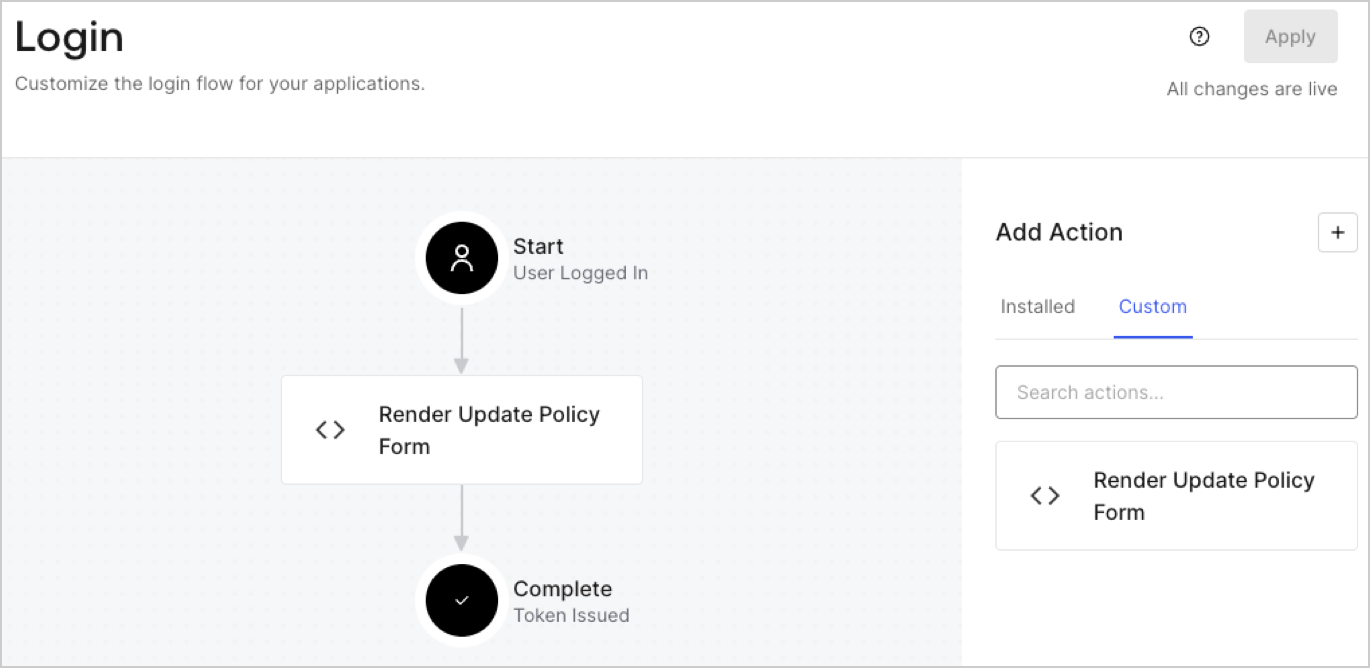
## Create a Post Login Action

Create a post-login Action to render your form by following these steps:

1. Navigate to **Auth0 Dashboard > Actions > Flows > Login.**
2. Select the **+** icon and Select **Build from scratch**:

   * **Name**: Enter `Render Update Policy Form`.
   * **Trigger**: Select `Login / Post Login`.
   * **Runtime**: Select the recommended version.
3. Select **Create**.

To configure the post-login Action:

1. Delete the existing code from the Code editor.
2. Paste the form render code into the Code editor.
3. Edit the code to define the conditional logic that will render the form.

   ```javascript lines theme={null}
   /**
   * @param {Event} event - Details about the user and the context in which they are logging in.
   * @param {PostLoginAPI} api - Interface whose methods can be used to change the behavior of the login.
   */
   exports.onExecutePostLogin = async (event, api) => {
     const FORM_ID = 'REPLACE_WITH_YOUR_FORM_ID';

     if (event.user.app_metadata.privacy_policies !== true) {
       api.prompt.render(FORM_ID);
     }
   }

   exports.onContinuePostLogin = async (event, api) => { }
   ```

   <Callout icon="file-lines" color="#0EA5E9" iconType="regular">
     The example code above will render the form when a user is missing the app metadata `privacy_policies` property.
   </Callout>
4. Select **Deploy.**
5. Drag and Drop the **Render Update Policy Form** Action to the **Login** flow.
   <Frame>
     <img src="https://mintcdn.com/docs-dev-react-sdk-reference/5pJm0gRjXnK1Z3tI/docs/images/cdy7uua7fh8z/5TOwDgevZsBqd7yZynUYWU/41ca909dc3007aed4f40ff794a05efa5/postlogin.png?fit=max&auto=format&n=5pJm0gRjXnK1Z3tI&q=85&s=35976102b5eaeb79daf7040aefdfac2e" alt="Dashboard > Forms > Use Case > Render update policy form login action" data-og-width="1370" width="1370" data-og-height="668" height="668" data-path="docs/images/cdy7uua7fh8z/5TOwDgevZsBqd7yZynUYWU/41ca909dc3007aed4f40ff794a05efa5/postlogin.png" data-optimize="true" data-opv="3" srcset="https://mintcdn.com/docs-dev-react-sdk-reference/5pJm0gRjXnK1Z3tI/docs/images/cdy7uua7fh8z/5TOwDgevZsBqd7yZynUYWU/41ca909dc3007aed4f40ff794a05efa5/postlogin.png?w=280&fit=max&auto=format&n=5pJm0gRjXnK1Z3tI&q=85&s=427383c157361a4ae1aec533ad87425c 280w, https://mintcdn.com/docs-dev-react-sdk-reference/5pJm0gRjXnK1Z3tI/docs/images/cdy7uua7fh8z/5TOwDgevZsBqd7yZynUYWU/41ca909dc3007aed4f40ff794a05efa5/postlogin.png?w=560&fit=max&auto=format&n=5pJm0gRjXnK1Z3tI&q=85&s=fa4a13e47201e925227ba10538d98cc3 560w, https://mintcdn.com/docs-dev-react-sdk-reference/5pJm0gRjXnK1Z3tI/docs/images/cdy7uua7fh8z/5TOwDgevZsBqd7yZynUYWU/41ca909dc3007aed4f40ff794a05efa5/postlogin.png?w=840&fit=max&auto=format&n=5pJm0gRjXnK1Z3tI&q=85&s=c7515638e630d7fa6c1d5c9dfa59a0ed 840w, https://mintcdn.com/docs-dev-react-sdk-reference/5pJm0gRjXnK1Z3tI/docs/images/cdy7uua7fh8z/5TOwDgevZsBqd7yZynUYWU/41ca909dc3007aed4f40ff794a05efa5/postlogin.png?w=1100&fit=max&auto=format&n=5pJm0gRjXnK1Z3tI&q=85&s=4be3229a900f8a1feed464cc7af24654 1100w, https://mintcdn.com/docs-dev-react-sdk-reference/5pJm0gRjXnK1Z3tI/docs/images/cdy7uua7fh8z/5TOwDgevZsBqd7yZynUYWU/41ca909dc3007aed4f40ff794a05efa5/postlogin.png?w=1650&fit=max&auto=format&n=5pJm0gRjXnK1Z3tI&q=85&s=c0dc5dd4465628d8f6a11af682569c5b 1650w, https://mintcdn.com/docs-dev-react-sdk-reference/5pJm0gRjXnK1Z3tI/docs/images/cdy7uua7fh8z/5TOwDgevZsBqd7yZynUYWU/41ca909dc3007aed4f40ff794a05efa5/postlogin.png?w=2500&fit=max&auto=format&n=5pJm0gRjXnK1Z3tI&q=85&s=e81f4560e4a4e93eee919fbbaf51b8b1 2500w" />
   </Frame>
6. Select **Apply.**

### Test implementation

Test the implementation by following these steps:

1. Log in with an existing user whose app`_metadata` attribute `privacy_policies` does not have a value.
2. The post-login Action in the Login flow will render the form and prompt for acceptance.
3. Select **Auth0 Dashboard > User Management > Users,** locate the user and verify that the `app_metadata` attribute `privacy_policies` contains a `true` value and a timestamp.
